Doric Neuroscience Studio V6
Doric Neuroscience Studio V6
Doric Neuroscience Studio is an intuitive software suite with multiple modalities. It controls Doric hardware and records and analyzes optogenetics, fiber photometry, miniature fluorescence microscopy, electrophysiology, and behavior camera experimental data.

Doric Neuroscience Studio is an intuitive software suite with multiple modalities. It controls Doric hardware and records and analyzes optogenetics, fiber photometry, miniature fluorescence microscopy, electrophysiology, and behavior camera experimental data.
Doric Neuroscience Studio software, with its different modules, controls the following Doric devices:
- Light sources (LED, Laser Diode, ★LISER™)
- Fiber Photometry Console
- Bundle Imaging System
- Miniature Fluorescence Microscope
- Electrophysiology Recording Headstage
- Optogenetics TTL Pulse Generator
- Behavior Camera
In addition to controlling those devices, the software contains the following data analysis modules for processing acquired data:
- Microscopy Image Analysis module (motion correction, ΔF/F, ...)
- Signal Analysis module (fiber photometry ΔF/F, filters, arithmetics, spike finding, ...)
- Behavior Analysis module (open-field tracking, motion score, and speed)
- more details to come soon
IMPORTANT : Before upgrading from version 5 to version 6 of Doric Neuroscience Studio software, users of Doric Lenses products should read the following information:
- DNS v6 requires a firmware update of the hardware
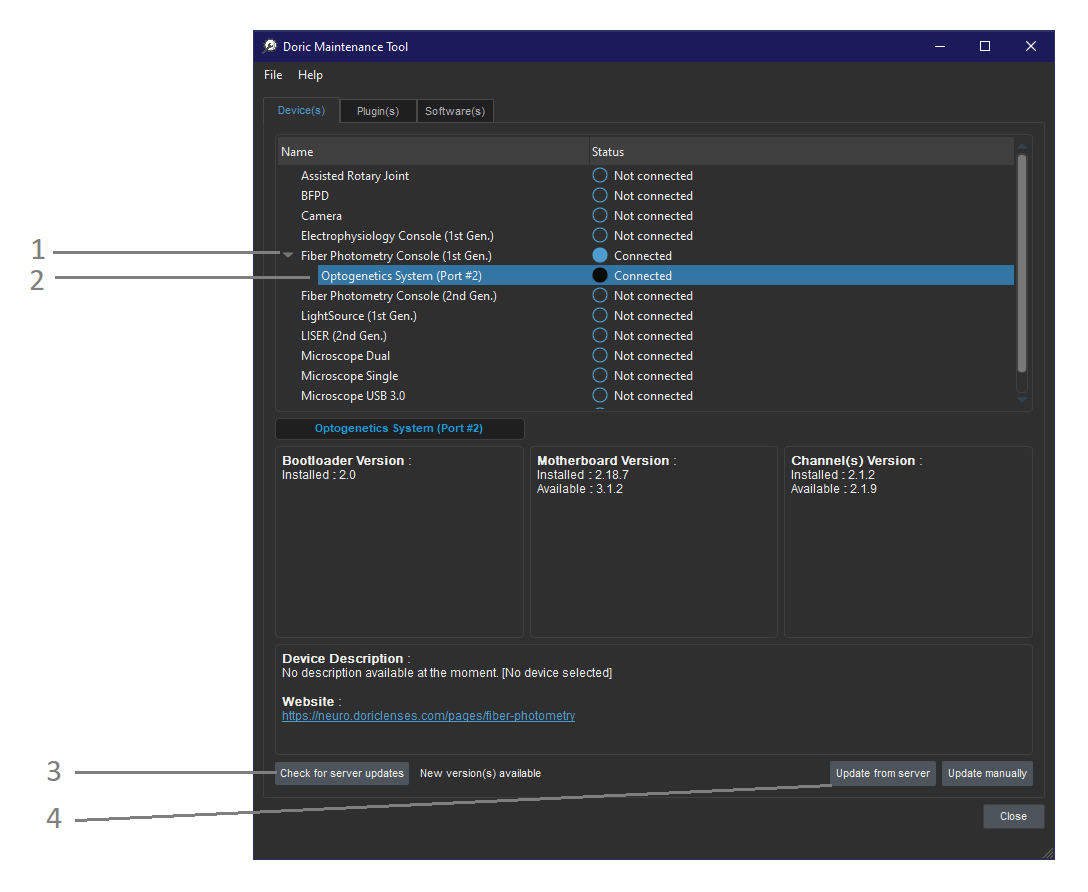
This is done by the user with Doric Maintenance Tool software included in the installation file. Use the 'Check for server updates' and 'Update from server', functions (see screen capture). If the update from sersver does not work, please contact Doric technical support before trying a manual update. - DNS v6 saves data into an HDF5 file with the ".doric" extension.
Files saved with DNS v6 can be analyzed with its data analyzer modules. HDF5 files can be read with Matlab, R, and Python. We created a GitHub repository with code examples to facilitate data analysis with external applications.
Operating System |
Microsoft Windows 10, 11; 64-bit |
RAM |
16 GB RAM minimum 32 GB RAM recommended |
Processor Speed |
2 GHz & 4 cores minimum 3 GHz & 8 cores recommended |
Hard Drive |
10 GB of free hard disk space + space for files * SSD recommended |
Graphics Card |
NVIDIA Graphics Card compatible with CUDA v12.9 or higher and cuDNN v1.9 or higher |
Related products
-
Choose your option
-
Choose your option
-
Choose your option
-
Choose your option
-
Choose your option